
There is a point in every growing company where buying laptops stops being a task and starts being a process. Usually it arrives somewhere between the fifteenth and thirtieth employee. Up to that point, someone in admin buys a machine whenever a new person joins, picking whatever looks reasonable that week. It works — until it doesn’t.
SparkonDigiTech provides corporate laptop supply in Bangalore. Call or WhatsApp +91 98451 41787 for a quote.
The symptoms are familiar to any IT or procurement manager who has inherited an unplanned fleet: nine different models across forty employees, three charger types that nobody can keep track of, warranty dates scattered across the calendar, and a two-week wait every time a screen cracks because nobody knows which panel that particular model takes.
None of that is caused by buying bad laptops. It is caused by buying them one at a time, without a procurement standard. This checklist covers how to build one.
Quick Answer
Corporate laptop procurement is the process of specifying, sourcing and standardising laptops for a company rather than buying them individually. A sound process covers role-based specification, standardising on two or three models, verifying serviceability and spare-part availability before committing, planning warranty and support coverage, and budgeting for the full ownership period rather than the purchase price alone.
Key takeaways
- Standardising on two or three models does more for long-term cost and support than optimising the specification of any single machine.
- Serviceability — whether memory is socketed, whether storage is user-replaceable, whether parts are obtainable — belongs in the purchase decision, not the repair conversation three years later.
- Purchase price is typically the smallest part of what a laptop costs a company over its life.
- A small pool of spare machines converts hardware failures from multi-day outages into same-hour swaps.
- An asset register started on day one costs nothing. Reconstructing one at 100 laptops costs weeks.
What corporate laptop procurement actually involves
Individual purchasing asks one question: which laptop should this person get? Corporate procurement asks five.
- Specification. What do different roles genuinely need? A field sales executive and a video editor should not be issued the same machine, and neither should be issued a machine chosen for the other.
- Standardisation. How few distinct models can you get away with while still meeting those needs?
- Sourcing. Who supplies them, on what commercial terms, with what documentation, and how quickly can they supply more of the same model in six months?
- Support. What happens when one fails — who diagnoses it, who repairs it, and what does the employee use meanwhile?
- Exit. What happens at the end of the machine’s useful life, and what value can be recovered then?
Most procurement problems that surface in year three were decided — usually by default — in year one, at questions two and five.
Why standardisation matters more than specification
Teams spend a lot of energy comparing processor generations and very little deciding how many models to run. The second decision has larger consequences.
When a company standardises on two or three models, several things become simpler at once:
- Spare parts become interchangeable. One keyboard, one display panel and one battery type covers a large share of your fleet instead of a single machine. Parts held for one laptop are usable across many.
- A failed machine can be swapped, not waited on. Identical models mean a spare unit is genuinely a drop-in replacement.
- Accessories stop multiplying. One charger type, one docking standard, one laptop bag size.
- Support knowledge compounds. Your IT team — or your service provider — learns the quirks of two models instead of relearning nine.
- Repeat quantities improve your commercial position. Returning to a supplier for the same model repeatedly is a stronger negotiating stance than buying a different machine each time.
The practical rule for most companies under 250 employees: two models covers it. A mainstream business laptop for the majority of roles, and a higher-specification machine for engineering, design or analytics. Add a third only when a role genuinely cannot be served by either.
Serviceability: the criterion most procurement processes skip
Two laptops with identical specification sheets can have very different five-year costs, and the difference rarely appears in the comparison table.
Before committing to a model, establish:
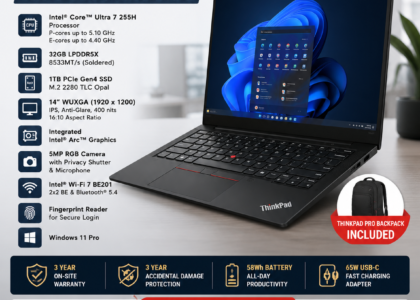
- Is the memory socketed or soldered? Soldered memory cannot be upgraded. Whatever you buy on day one is what that machine has for its entire life — so if you are choosing a soldered configuration, buy the memory you will need in year four, not year one.
- Is the storage user-replaceable, and what interface and form factor does it use? This determines whether a storage upgrade or a failed-drive replacement is a routine job or a difficult one.
- How is the battery mounted? Internal batteries are normal on modern business machines, but they change what a battery replacement involves.
- Is the keyboard a separate part, or bonded into the upper case? On many current models it is the latter, which means a spilled cup of coffee is a larger job than people expect.
- Are replacement parts obtainable for this model in India? This is the question almost nobody asks at purchase, and the one that determines whether year-three repairs are straightforward or a scavenger hunt.
Ask your supplier directly whether spare parts for the specific model are available, and note that availability varies by part and by model — it is not a single yes or no. Getting a realistic answer before you buy fifty units is worth considerably more than a marginally better price.
The four costs beyond the purchase price
Companies budget for laptops as capital expenditure and then absorb the rest as unplanned operational spending. Four costs are worth making explicit:
| Cost | What it covers | How to reduce it |
|---|---|---|
| Support and repair | Diagnosis, parts, labour, out-of-warranty work | Standardisation; buying serviceable models; preventive maintenance |
| Downtime | The employee’s time while a machine is unavailable, and the work that doesn’t happen | A spare pool; swap-and-repair rather than wait-and-repair |
| Accessories and peripherals | Chargers, docks, monitors, bags, headsets, replacements for lost items | Standard kits; consistent charger and dock types across models |
| Disposal and residual value | Secure data handling and disposal at end of life — partly offset by resale or buyback value | Retiring machines while they still hold value, rather than storing them |
Downtime is usually the largest and the least measured. A useful exercise: take the fully-loaded daily cost of an employee, multiply by the number of working days a failed laptop typically costs you, and compare that figure to what a spare machine would have cost. For most companies the arithmetic settles the question immediately.
The 12-point procurement checklist
Work through this before raising a purchase order.
- Role requirements documented. Which roles need what, expressed as specification ranges rather than product names.
- Model count decided. Two or three, with a written reason for any additional model.
- Specification floor set. A minimum memory and storage configuration below which you will not buy, chosen for the machine’s whole life rather than its first year.
- Commercial vs consumer line confirmed. Business ranges generally offer better build quality, longer part availability and management features; consumer ranges are built to a price.
- Serviceability verified. Memory, storage, battery, keyboard — checked against the questions above.
- Spare-part availability checked for the specific model, honestly, before commitment.
- Warranty terms understood. Duration, what is covered, what is excluded, whether it is on-site or carry-in, and what the process actually is.
- Quantity and phasing planned against your hiring forecast, so you are not returning to market every three weeks.
- Spare units budgeted as part of the order, not as an afterthought.
- Accessories included in the budget. Chargers, docks, bags and peripherals are a real line item.
- Documentation confirmed. Invoice with serial numbers, warranty registration, and delivery records your finance team can reconcile.
- Asset register prepared before the machines arrive — serial number, model, machine type, purchase date, warranty expiry, assigned user, location.
How many spare machines should you hold?
A reasonable starting point is around three to five percent of fleet size, with a minimum of one. Twenty laptops means one spare; fifty means two; a hundred means three or four.
The value is not in the machines themselves but in what they do to your support model. Without spares, every hardware failure is urgent, and the employee waits however long diagnosis and repair take. With spares, the employee is working again within the hour and the faulty machine joins a queue that can be handled sensibly — batched, properly diagnosed, and repaired without pressure. Repair turnaround stops being a crisis variable.
Spares also give you somewhere to put machines during upgrades, and a buffer when a new joiner starts earlier than planned.
Common procurement mistakes
- Buying whatever is discounted this month. Every opportunistic purchase adds a model to your fleet, and the saving is usually smaller than the long-term support cost it creates.
- Specifying for today’s workload. A machine bought at the minimum viable specification is at the end of its useful life the moment requirements grow — which, on soldered-memory models, cannot be fixed later.
- Over-specifying uniformly. The mirror-image error: issuing high-specification machines to roles that will never use the capability.
- Treating warranty as a single thing. Coverage type, response model and exclusions matter more than the number of years.
- No asset register from day one. Recording serial numbers as machines arrive takes minutes. Reconstructing the register later, across a hundred deployed laptops, takes weeks.
- Forgetting the exit. Machines retired thoughtfully retain value. Machines that sit in a storeroom for eighteen months while someone decides do not.
- No process for departures. Laptops that leave with employees and never return are a procurement problem before they are an HR one.
When to involve a hardware partner
Plenty of companies handle procurement perfectly well themselves, particularly at smaller scale. Involving a hardware partner tends to earn its keep when:
- you are buying in quantity and want model options compared against your actual role requirements;
- you need a realistic answer about spare-part availability for a model before you commit;
- you want procurement, servicing and eventual buyback handled coherently rather than by three unrelated vendors;
- you have no internal IT function and the alternative is an office manager making hardware decisions between other responsibilities.
If you are buying five laptops of a mainstream model with no unusual requirements, buying direct is entirely sensible. The calculation changes with volume, with fleet complexity, and with how much the business depends on those machines staying up.
How SparkonDigitech can help
SparkonDigitech is an IT hardware and services company based in Bengaluru, Karnataka, working with businesses across laptop sales, servicing and spare-part sourcing, corporate buyback and IT accessories. We work with corporate IT and procurement teams on model selection, quantity-based quotations, and the questions that matter after purchase — which parts are obtainable for a given model, how a fleet should be supported, and what a machine will be worth when you retire it.
Because we also repair laptops and source spare parts, we tend to look at procurement decisions through their consequences: how easily a model can be serviced, and whether parts for it can realistically be obtained in a few years’ time.
Specification tiers by role
Buying one specification for everyone means either overpaying for most of the company or under-equipping the people who need capability. Three tiers cover most organisations.
| Tier | Typical roles | What to prioritise | What to avoid |
|---|---|---|---|
| Mobility | Field sales, client-facing, frequent travel | Weight, battery life, build strength, connectivity | Paying for graphics or processor capability that will never be used |
| Standard office | Admin, HR, finance, operations, support, management | Comfortable memory headroom, solid-state storage, a display good enough for all-day use | Minimum-configuration memory, especially where it is soldered |
| High performance | Development, design, video, analytics, engineering | Processor capability, generous memory, fast large-capacity storage, colour-accurate display where relevant | Assuming a mobility-tier machine can be “upgraded later” if memory is soldered |
Deliberately expressed as priorities rather than exact figures. Component generations move faster than procurement policies, and a tier defined by what a role needs stays valid when a specific chip does not.
Reading the specification that matters
Memory
The most consequential number, because it is the one most likely to be fixed for the machine’s life. Establish first whether memory is socketed or soldered. If soldered, specify for year four, not year one — you will not get another opportunity. If socketed, you have the option of starting lower and upgrading when required.
Storage
Solid-state storage should be treated as a baseline rather than an upgrade for corporate machines. Beyond that, capacity should reflect how the role actually works: heavy local file work needs room, while cloud-first roles often need less than people assume. Note the interface and form factor too, since they determine what a future upgrade or replacement involves.
Processor
Usually over-weighted in buying decisions. Beyond a reasonable current-generation business processor, most office workloads are limited by memory and storage long before the processor. Spend the marginal rupee on memory first.
Display
Under-weighted, and the component the employee looks at all day. Resolution, brightness and panel type affect comfort and, over years, eye strain. Also decide touch versus non-touch deliberately — it affects the replacement part later, and mixing both within one model creates variants your spares planning has to track.
Battery, ports and weight
These matter enormously for mobility roles and barely at all for a machine that sits permanently on a desk. Check what the ports actually support rather than counting them — USB-C ports vary in whether they carry video output and charging, and that determines whether your chosen docking station will work.
Warranty: read the type, not the duration
“Three-year warranty” describes very little. What matters:
- Coverage type. Standard hardware warranty, or extended cover that includes accidental damage? Screens and spills are the common real-world failures, and standard warranties generally exclude them.
- Response model. On-site service, carry-in to a service centre, or collect-and-return? These produce very different downtime, and the difference matters more than an extra year of cover.
- Exclusions. Batteries are frequently covered for a shorter period than the machine, since they are treated as consumables.
- The actual process. Who calls whom, what evidence is needed, and how long claims genuinely take. Worth asking other customers rather than the vendor.
For a fleet, a shorter warranty with on-site response often serves you better than a longer one requiring you to ship machines away.
A sample specification sheet
Send this structure to vendors rather than asking what they recommend.
- Quantity and phasing — how many, delivered when
- Tier — mobility, standard office, or high performance
- Processor — family and generation acceptable
- Memory — minimum capacity, and whether socketed memory is required
- Storage — minimum capacity, solid-state, interface if relevant
- Display — size, minimum resolution, touch or non-touch
- Ports — required port types and what they must support
- Operating system — edition and licensing
- Warranty — duration, coverage type, response model
- Weight ceiling — for mobility roles
- Accessories — chargers, docks, bags, peripherals
- Documentation — invoice with serial numbers, warranty registration
Two useful effects. Comparable quotes, because everyone is pricing the same thing. And a written record of what you decided, which is what makes your next purchase consistent with this one.
Frequently asked questions
How many laptop models should a company standardise on?
Two is sufficient for most companies below 250 employees — a mainstream business machine for the majority of roles and a higher-specification option for engineering, design or analytics roles. A third is worth adding only when a specific role genuinely cannot be served by either. Every additional model adds spare-part variety, accessory variety and support complexity.
Is it cheaper to buy laptops in bulk?
Quantity generally improves your commercial position, but the larger saving usually comes from standardisation rather than the unit discount — fewer models means lower support, spares and accessory costs across the machine’s life. Bulk purchasing also lets you phase deliveries against a hiring plan instead of buying reactively.
Should companies buy business laptops or consumer models?
Business ranges are generally the better choice for corporate use. They tend to offer sturdier construction, longer availability of spare parts, more consistent configurations across a production run, and management and security features that consumer machines omit. Consumer models are built to a retail price point, and the compromises usually appear in serviceability and part availability.
How many spare laptops should we keep?
Roughly three to five percent of fleet size, with at least one. The purpose is to convert a hardware failure from a multi-day outage into a same-hour swap, which also removes the pressure to rush repairs.
What documentation should we get with a bulk laptop purchase?
A tax invoice listing serial numbers, warranty registration details for each unit, and delivery documentation your finance team can reconcile against the purchase order. Serial numbers matter more than most buyers expect — they are what your asset register, warranty claims and eventual disposal records are all built on.
How do we check whether spare parts will be available for a laptop model?
Ask your supplier or service provider directly about the specific model, and treat availability as varying by part rather than as a single answer for the machine. Note the machine type and model designation (often shown on the label on the underside of the laptop) — that identifier, not the marketing name, is what parts are matched against.
Should a growing company buy or lease laptops?
Buying suits companies with stable headcount and a preference for owning assets; leasing suits companies that want predictable monthly costs and regular refreshes without managing disposal. The right answer depends on your cash position, growth rate and how your finance team prefers to treat the expenditure — it is worth deciding deliberately rather than defaulting to whichever you did last time.
Getting the process in place
Nothing in this checklist requires a large IT department or specialist software. It requires deciding a standard once, writing it down, and applying it consistently — which is precisely what the one-machine-at-a-time approach never does.
The companies that avoid fleet chaos at eighty employees are not the ones that bought better laptops. They are the ones that decided, at twenty employees, which two models they were going to buy.
Planning a bulk laptop purchase? Talk to SparkonDigitech about model selection, serviceability and quantity-based quotations — get in touch with our team.
Need help with this for your company? See our corporate laptop supply in Bangalore page, or call +91 98451 41787 (Mon–Sat, 10 AM–7 PM).