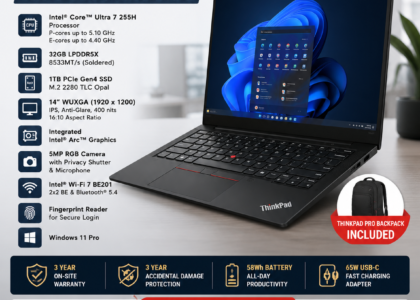

When a laptop in a corporate fleet develops a fault, the first instinct is often to replace it. That instinct is sometimes right — but not always. A cracked palm rest on a two-year-old ThinkPad with a current-generation processor and 16GB of RAM is not a reason to retire the machine. It is a spare part. The same logic applies to a worn keyboard, a loose hinge, a broken display bezel, or a failed USB port board. In each case, sourcing the correct genuine spare part and having it professionally fitted extends the asset’s useful life — often by another two to three years — at a fraction of the cost of a new machine.
SparkonDigiTech provides laptop spare parts in Bangalore. Call or WhatsApp +91 98451 41787 for a quote.
For IT managers responsible for corporate laptop fleets, understanding when repair is the right call, which parts are available, and how to source them correctly in Bangalore is a practical skill that directly affects the total cost of ownership of every device in the fleet.
Quick Answer
Laptop spare parts for corporate fleet repair include palm rests/upper cases, lower base covers, display panels, keyboards, hinges, USB and I/O port boards, and batteries. For Lenovo ThinkPad and ThinkBook models, genuine parts are generation-specific and identified by FRU (Field Replaceable Unit) or part numbers. Fitting the wrong generation part causes alignment and compatibility failures. A local Bangalore-based spare parts supplier who can identify the correct part number for your exact model and fit it on-site is significantly faster and more reliable than ordering from generic online sources and attempting self-installation on a corporate device.
When Repair Makes More Sense Than Replacement
- Repair is the right call when the device has a current-generation processor (10th generation or newer for Intel, Ryzen 5000 or newer for AMD), functional RAM and SSD, and the fault is a physical component — keyboard, palm rest, display bezel, hinge, I/O board — rather than a motherboard failure.
- Replacement is the right call when the device is on an old-generation processor, the motherboard has failed, or the cost of repair approaches a meaningful percentage of a comparable refurbished replacement.
- The grey zone — a device requiring multiple simultaneous repairs. Compare the total repair cost versus a refurbished replacement directly before deciding.
A corporate laptop that cost ₹70,000 new and now has a cracked palm rest has not lost its compute capability. Replacing the palm rest and returning it to service for another two years represents a significantly better outcome than writing it off and procuring a new unit.
Which Laptop Parts Fail Most Often in Corporate Fleets
Palm Rest / Upper Case
The palm rest is one of the highest-contact surfaces on a laptop — constant daily contact from wrists, frequent handling, and travel causes cracking and cosmetic wear. A cracked palm rest does not affect performance but is one of the most commonly replaced structural parts in a business laptop fleet.
For Lenovo ThinkPad L14 models, palm rest part numbers differ by generation: Gen 1 (FRU 5CB0S95395 / 5CB0S95397), Gen 3 (FRU 5CB0Z69509), and Gen 5 (PN 460.0VQ0G.0021). Fitting a Gen 1 palm rest into a Gen 3 chassis causes misalignment. Generation-correct identification before ordering is not optional.
Lower Base / Bottom Cover
The lower base is vulnerable to cracking from drops, pressure damage in transit, and general wear. A damaged lower base exposes internal components to dust and debris — making it a functional concern as well as a cosmetic one. Lower base replacements are generation-specific and available in new, refurbished, and used condition grades.
Display Panel
Display failures fall into two categories: physical damage (cracked screen from impact) and panel failure (dead pixels, backlight failure, display lines). Display panels are model and resolution-specific — an FHD replacement cannot be substituted with an HD panel due to connector and bracket differences. The specific panel variant must be matched to the chassis.
Keyboard
Keyboards endure significant daily use in a corporate environment. Individual keys wear, legends fade, key mechanisms fail, and minor spillage causes key failures without necessarily damaging the underlying board. Keyboard replacement is one of the most common corporate laptop repairs and, for ThinkPad models, is typically a straightforward part-and-fit job.
Hinges
Hinge failure — one hinge loosening, cracking, or breaking — is common in laptops opened and closed frequently. A failed hinge can cause the display to drop or not hold position, and in more severe cases can crack the display bezel. Hinge repairs require the correct part matched to the specific model.
USB Port and I/O Boards
USB ports and charging ports fail from repeated connection and disconnection of peripherals and docking stations. Failed USB-A or USB-C ports are typically caused by the I/O port board rather than the motherboard — meaning they are repairable by replacing the board rather than the entire mainboard.
Battery
Laptop batteries degrade over charge cycles. In a corporate fleet, batteries typically need replacement between years 2 and 4. A swollen battery is a safety issue requiring immediate replacement regardless of the device’s overall condition or age.
The Critical Importance of Correct Part Numbers
ThinkPad spare parts are highly generation-specific. The same laptop series across different generations may have different chassis dimensions, different screw patterns, different cable routing, different connector types, and different panel mounting points. A part from the wrong generation will not align correctly, will leave gaps, or will prevent the machine from closing properly.
For Lenovo ThinkPad and ThinkBook models, genuine parts are identified by FRU (Field Replaceable Unit) numbers or part numbers (PN). Before ordering or fitting any spare part, the correct FRU or PN for the exact model variant must be confirmed. A specialist supplier confirms this before supplying the part — a generic marketplace listing a “ThinkPad L14 palm rest” without confirming the FRU frequently results in a part that fits a different generation.
New, Refurbished, and Used Parts: Understanding the Difference
| Condition | Description | Best For |
|---|---|---|
| New | Unused genuine OEM part, original packaging | Current-gen models in warranty or lease; high-visibility repairs |
| Refurbished | Genuine part, tested, cleaned, verified functional | Mid-age fleet repairs; parts no longer available new |
| Used | Genuine part pulled from a retired unit, tested functional | Older or discontinued models; cost-sensitive bulk fleet repair |
A refurbished or used part from the correct FRU is significantly preferable to a new part from the wrong generation. For corporate fleet repairs where multiple identical repairs are needed across a cohort of the same model, refurbished or used parts can represent meaningful cost savings without sacrificing repair quality.
Why Professional Fitting Matters for Corporate Devices
Self-installation of laptop spare parts on corporate devices carries risks that do not apply to a personal machine. In a corporate context, an incorrectly fitted part or a damaged ribbon cable during a self-repair can convert a straightforward repair into a more expensive fault. For a fleet of identical machines, a professional spare parts supplier who is familiar with that exact model can complete a repair faster, with lower risk, and with a verified outcome.
For IT managers responsible for multiple devices, having a local Bangalore-based supplier who can handle parts sourcing and fitting at the same location reduces logistics, reduces downtime, and removes the uncertainty of ordering parts from online marketplaces where part condition and generation compatibility are rarely confirmed before dispatch.
Spare Parts and Fleet Lifecycle Management
Understanding spare parts availability is also relevant to fleet lifecycle planning. When a specific model is being retired from manufacture, spare parts availability begins to decline — first new parts, then refurbished, and eventually used. Knowing when parts for your current fleet generation will become scarce can inform your refresh cycle planning.
For IT managers running a fleet of Lenovo ThinkPad L14 or similar business-grade machines, the practical questions are straightforward: Can you still source genuine parts for that generation? What does a palm rest or display repair cost versus the cost of a replacement refurbished unit? What is the expected remaining useful life of the device after repair? These questions, answered correctly for your specific fleet composition, determine the right repair-versus-replace decision for each device cohort.
Need Spare Parts for Your Corporate Laptop Fleet?
SparkonDigitech supplies genuine laptop spare parts for ThinkPad, ThinkBook, and other business-grade laptops in Bangalore. Palm rests, lower bases, keyboards, display panels, hinges, USB boards, and batteries — generation-specific, FRU-verified sourcing with professional on-site fitting available.
Call: +91 98451 41787 | Email: sales@sparkondigitech.com
SparkonDigitech: Spare Parts and Repair for Corporate Laptop Fleets in Bangalore
SparkonDigitech provides laptop spare parts and repair services for corporate IT fleets in Bangalore. The company’s service work includes supply and fitting of structural components (palm rests, lower bases, display panels, keyboards, hinges) and functional components (USB and I/O boards, batteries) for Lenovo ThinkPad, ThinkBook, and other business-grade laptop models.
For corporate clients, SparkonDigitech’s service approach addresses the part number identification requirement directly — confirming the correct FRU or PN for the specific model generation before supplying the part. This is particularly relevant for ThinkPad L14 and similar series where palm rest, lower base, and display panel parts are generation-specific.
Address: 696, 4th Main Rd, BEML Layout, 5th Stage, Rajarajeshwari Nagar, Bengaluru – 560098
Phone: +91 98451 41787
Email: info@sparkondigitech.com | sales@sparkondigitech.com
Website: sparkondigitech.com
Frequently Asked Questions
What laptop spare parts are most commonly needed in a corporate fleet?
Palm rests and upper cases, lower base covers, keyboards, display panels, hinges, USB and I/O port boards, and batteries are the most frequently replaced parts in business laptop fleets. Physical wear components (palm rests, keyboards, hinges) degrade with daily use; batteries degrade with charge cycles; display panels and I/O boards fail from impact or port wear.
Are ThinkPad spare parts interchangeable across generations?
No. ThinkPad spare parts are generation-specific. A palm rest designed for a ThinkPad L14 Gen 1 (FRU 5CB0S95395) will not align correctly in a Gen 3 chassis (FRU 5CB0Z69509). Before ordering any structural part, the correct FRU or part number must be confirmed for the exact model and generation.
What is a FRU number and why does it matter for laptop repairs?
FRU stands for Field Replaceable Unit. It is Lenovo’s part identification system for components that can be replaced in the field (as opposed to components soldered to the motherboard). The FRU number uniquely identifies a part for a specific model variant and generation, ensuring the correct compatible component is ordered. For ThinkPad spare parts, ordering by FRU number eliminates generation mismatch errors.
When should a corporate laptop be repaired versus replaced?
Repair is generally the right choice when the device has a current-generation processor, functional RAM and SSD, and the fault is a physical component rather than a motherboard failure. Replacement makes sense when the device is old-generation, has a motherboard fault, or requires multiple simultaneous repairs where the total cost approaches the price of a comparable refurbished replacement.
Is it safe to use refurbished or used spare parts for corporate laptop repairs?
Yes, when the part is from the correct generation and has been tested as functional. A refurbished or used genuine OEM part from the correct FRU is preferable to a new aftermarket part of uncertain quality. For older or discontinued models where new parts are no longer available, refurbished and used genuine parts are often the only viable option.
Can a failed USB port be repaired without replacing the motherboard?
In most ThinkPad and ThinkBook models, yes. USB-A and USB-C ports are typically mounted on a separate I/O or USB port board connected to the motherboard by a cable or connector. A failed USB port is usually repairable by replacing the I/O board rather than the motherboard, which is a significantly lower-cost repair.
How do I know if a laptop battery needs to be replaced?
Indicators include significantly reduced runtime compared to a new battery, failure to charge past a certain percentage, and any physical swelling of the battery (visible as a raised or bulging bottom cover). A swollen battery is a safety issue and requires immediate replacement. Battery health can also be assessed via Windows battery health report or Lenovo Vantage diagnostics.
How long can a business laptop be kept in service with regular repairs?
With structural repairs (palm rest, keyboard, display) and battery replacement as needed, a well-specified business laptop — i7/Ryzen 7, 16GB RAM, SSD — can typically remain productive for five to seven years. The practical limit is usually the point at which the processor generation becomes too slow for current applications, not physical wear.
Does SparkonDigitech supply spare parts for laptop models other than ThinkPad?
SparkonDigitech’s core service focus is on Lenovo ThinkPad and ThinkBook corporate fleet models. For information on spare parts availability for other business laptop brands and models, contact the team directly at +91 98451 41787 or sales@sparkondigitech.com.
How can an IT manager get a cost estimate for fleet spare parts in Bangalore?
Contact SparkonDigitech with the model name, generation, and the specific part or fault description. The team can confirm part number compatibility, provide pricing for new, refurbished, or used parts as appropriate, and advise on fitting. For bulk fleet repairs involving multiple identical devices, volume pricing may be available.
Need help with this for your company? See our laptop spare parts in Bangalore page, or call +91 98451 41787 (Mon–Sat, 10 AM–7 PM).