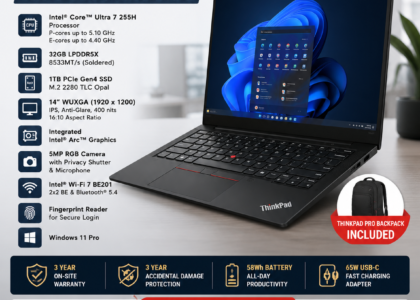

The Lenovo ThinkPad T14 is widely used as a business and corporate laptop, but sourcing the correct replacement component can be challenging because different T14 generations and machine types can use different parts. A T14 battery, display, keyboard, fan, hinge or motherboard that looks similar to another T14 component may not necessarily be compatible.
SparkonDigiTech provides laptop spare parts in Bangalore. Call or WhatsApp +91 98451 41787 for a quote.
This guide explains how to identify ThinkPad T14 spare parts, which components are commonly replaced, how to verify compatibility, and what corporate IT teams, repair companies and individual customers should check before purchasing.
Quick Answer: Where Can I Get Lenovo ThinkPad T14 Spare Parts in Bangalore?
ThinkPad T14 replacement parts can be sourced through Lenovo’s official parts/support channels, authorized service channels, specialized laptop-parts suppliers, repair companies and established IT hardware vendors. Always provide: exact T14 generation, machine type, model number, serial number where appropriate, part name, existing part number or FRU, quantity, and condition/warranty requirement. Instead of “Lenovo T14 battery,” provide: “Lenovo ThinkPad T14 Gen 3, exact machine type, battery, existing FRU/part number, quantity.” This significantly reduces the risk of receiving an incompatible component.
Why ThinkPad T14 Parts Require Exact Identification
The ThinkPad T14 has been produced across multiple generations and configurations. Different generations can have different motherboards, batteries, displays, keyboards, display cables, cooling systems, fans, hinges, palm rests, bottom covers, speakers, camera assemblies, and internal cables. Lenovo’s parts system distinguishes between configurations and machine types — its parts interface can show an as-built list of parts for a specific product, while model or machine-type searches provide a broader compatible-parts list. The safest approach is to identify the exact machine before ordering a replacement.
ThinkPad T14 Generations Reference
| T14 Generation | Example Machine Types |
|---|---|
| T14 Gen 1 | 20S0, 20S1 |
| T14 Gen 2 | 20W0, 20W1 |
| T14 Gen 3 | 21AH, 21AJ, 21CF, 21CG |
| T14 Gen 4 | 21HD, 21HE, 21K3, 21K4 |
| T14 Gen 5 | 21ML, 21MM |
Important: Do not use this table alone to select a part. Always verify the exact machine configuration and part number before ordering.
How to Identify Your ThinkPad T14
Before contacting a spare-parts supplier: check the laptop label (product name, machine type, model, serial number); check BIOS/UEFI system information; check Windows System Information; and use Lenovo’s support system, which can identify a ThinkPad by serial number or product information and provide access to product-specific parts information.
What Is a ThinkPad FRU Number?
FRU generally refers to a Field Replaceable Unit identifier used for service parts. A ThinkPad component may have an identifying number printed on a label — depending on the component, you may find a FRU number, part number, assembly number, or manufacturer information. For a replacement request, photographing the existing part label can be extremely useful.
Two T14 laptops may both be called “ThinkPad T14” but could have different generations, processors, display configurations, keyboard layouts, battery configurations, and motherboard configurations. The same-looking component may therefore have a different part number — a supplier should confirm the replacement using the exact part number, FRU or compatible configuration rather than relying only on the product family name.
Common Lenovo ThinkPad T14 Spare Parts
1. ThinkPad T14 Battery
Before ordering, verify: T14 generation, machine type, battery part number, voltage, capacity, connector, physical configuration, compatibility, condition, and warranty. Lenovo specifically advises that replacement batteries should be approved/compatible parts specified for the device. For corporate fleets with 20–50 T14 units requiring batteries, procurement should create a model/FRU-based requirement rather than ordering based only on “T14.”
2. ThinkPad T14 Display
A T14 display can vary by resolution, touch vs non-touch, panel type, connector, mounting configuration, brightness/specification, and display options. A 14-inch screen is not automatically compatible with every T14. Verify the original panel details and part number before purchasing.
3. ThinkPad T14 Keyboard
ThinkPad T14 keyboards can differ based on generation, keyboard language, regional layout, backlight, fingerprint/power-button configuration, top-case design, and connector. For Indian corporate customers, confirm the English/India layout where applicable.
4. ThinkPad T14 Palm Rest / Top Case
The palm rest or upper case can include or interact with the touchpad, fingerprint reader, keyboard mounting, buttons, and cables. A damaged palm rest may sometimes require an assembly rather than only a cosmetic replacement.
5. ThinkPad T14 Fan
A noisy or non-functional cooling fan may result in excessive noise, higher temperatures, reduced performance, thermal throttling, or unexpected shutdowns. Before replacing the fan, the cooling system should be inspected and the actual cause diagnosed.
6. ThinkPad T14 Heatsink
A replacement heatsink must match the relevant processor configuration, motherboard, mounting arrangement, and thermal design. Do not assume that all T14 heatsinks are interchangeable.
7. ThinkPad T14 Hinge
Hinge problems may occur because of physical damage, excessive hinge resistance, chassis damage, or repeated mechanical stress. A hinge replacement should also be checked for damage to the display cover, base, or mounting points.
8. ThinkPad T14 Display Cable
Display cables are highly model-specific. A replacement cable should be verified against T14 generation, display configuration, connector, cable routing, and part number. A cable that looks similar may still have a different pinout or connector arrangement.
9. ThinkPad T14 Motherboard
Before sourcing a replacement motherboard, verify: exact T14 generation, machine type, CPU configuration, graphics configuration, board part number, connector configuration, and BIOS/firmware considerations. A motherboard should never be ordered based only on “T14 Gen 3 motherboard” — exact board identification must be confirmed first.
10. ThinkPad T14 SSD
Before replacing the SSD, verify the supported interface, physical format and system requirements. For corporate devices, data handling and secure disposal of the old drive should also be considered.
11. ThinkPad T14 RAM
Before purchasing or upgrading memory, verify: memory technology, capacity, speed, form factor, soldered vs removable memory, and maximum supported configuration. Do not assume that a RAM module from another laptop will work simply because it has the same capacity.
Generation-Specific Parts
T14 Gen 1 (20S0, 20S1): Common requirements include battery, display, keyboard, fan, heatsink, motherboard, palm rest, hinges, and display cable. Always verify the exact part number.
T14 Gen 2 (20W0, 20W1): Lenovo’s parts system distinguishes these configurations. Potential requirements include battery, display, keyboard, fan, heatsink, palm rest, bottom cover, hinges, display cable, motherboard, and speakers.
T14 Gen 3 (21AH, 21AJ, 21CF, 21CG): Lenovo provides service documentation covering T14 Gen 3 replacement procedures. Common parts include battery, display, keyboard, fan, heatsink, hinge, palm rest, motherboard, and display cable.
T14 Gen 4 (21HD, 21HE, 21K3, 21K4): Lenovo’s current service documentation specifically identifies these platforms. Verify exact machine type and part number before ordering.
T14 Gen 5 (21ML, 21MM): Because newer T14 generations can have different internal designs and configurations, exact machine identification becomes increasingly important.
OEM vs Compatible ThinkPad T14 Parts
Original/Genuine parts are preferable when business reliability is important, the device is under support/warranty, or the customer requires original specifications. Compatible parts may be appropriate when original stock is unavailable, the laptop is older, or cost is important and a tested compatible part is available. Used/pulled parts may be useful for older T14 systems, cost-sensitive repairs, refurbishment, or discontinued components — request condition, testing status, photos where appropriate, warranty, and return terms.
ThinkPad T14 Spare Parts for Corporate IT Teams
Corporate IT departments managing dozens or hundreds of ThinkPad systems should maintain a detailed inventory rather than a simple “T14 battery – 20 units” list:
| Field | Example |
|---|---|
| Brand / Family / Generation | Lenovo ThinkPad T14 Gen 3 |
| Machine Type | 21AH |
| Part + FRU/Part Number | Battery + exact number |
| Quantity + Condition | 20 × New |
| Warranty + Location | Required warranty, Bangalore |
ThinkPad T14 Repair vs Replacement
Consider repair when: laptop performance remains adequate, repair cost is reasonable, replacement part is available, device has useful remaining life, and repair can be completed reliably. Consider replacement when: multiple major components have failed, repair cost is too high, parts are unavailable, the device is obsolete, or performance no longer meets business requirements. The decision should consider repair cost + downtime + remaining useful life.
Common Mistakes When Buying ThinkPad T14 Parts
- Buying by series name only — “T14 battery” is not enough
- Ignoring generation — T14 Gen 1, 2, 3 and 4 can have different parts
- Ignoring machine type — machine type helps narrow compatibility
- Not checking the FRU — the existing component’s part number is extremely useful
- Buying the cheapest part — condition, quality and warranty matter
- Not confirming return terms — important for expensive components
- Ordering before diagnosis — you may replace a part that was not actually faulty
Need Lenovo ThinkPad T14 Spare Parts in Bangalore?
Share your T14 generation, machine type, exact part required, FRU/part number, quantity, and condition/warranty requirement. SparkonDigitech can evaluate availability and sourcing based on your specific requirement.
Phone: +91 98451 41787 | Email: sales@sparkondigitech.com
How SparkonDigitech Can Help With ThinkPad T14 Spare Parts in Bangalore
SparkonDigitech provides IT sales and service solutions for businesses in Bengaluru. For customers requiring Lenovo ThinkPad T14 spare parts — batteries, displays, keyboards, palm rests, hinges, fans, heatsinks, display cables, speakers, SSDs, RAM, motherboards, and other model-specific components — the requirement should be provided with T14 generation, machine type, exact part, FRU/part number, quantity, and condition/warranty requirement.
Important: Part availability, pricing, condition, warranty and delivery timelines can vary by model and part and should be confirmed before purchase.
Address: 696, 4th Main Rd, BEML Layout, 5th Stage, Rajarajeshwari Nagar, Bengaluru – 560098
Phone: +91 98451 41787
Email: info@sparkondigitech.com | sales@sparkondigitech.com
Website: sparkondigitech.com
Frequently Asked Questions
Where can I buy Lenovo ThinkPad T14 spare parts in Bangalore?
ThinkPad T14 parts can be sourced through Lenovo support/parts channels, authorized service channels, specialized laptop-parts suppliers and established IT hardware vendors. The correct supplier depends on the required part, generation, condition and warranty requirement.
How do I identify my ThinkPad T14 generation?
Check the laptop’s model information, machine type, serial number, BIOS/UEFI or Lenovo support information. The machine type is particularly useful when identifying the correct parts.
Can I use a T14 Gen 2 part in a T14 Gen 3?
Not automatically. Compatibility must be verified for the specific component, machine type and configuration.
What is the most important information when ordering T14 parts?
The exact model/generation, machine type and existing FRU or part number are among the most useful identifiers.
Where can I find the T14 FRU number?
The FRU or part number may be printed on the existing component. Lenovo’s support/parts tools can also help identify parts using product information.
Can I buy used ThinkPad T14 parts?
Yes. Used or pulled parts may be suitable for some repairs and refurbishment projects. Confirm testing, condition, warranty and return terms before purchasing.
Are T14 Gen 3 and T14 Gen 4 batteries interchangeable?
Do not assume they are interchangeable. Verify the exact battery part number and compatibility for the specific machine type.
Can a ThinkPad T14 motherboard be repaired?
Some motherboard faults may be repairable at board level. Other failures may require motherboard replacement. A technical diagnosis should be performed before ordering a replacement board.
Can companies buy T14 parts in bulk?
Yes. Corporate IT teams, AMC providers and repair companies can request bulk quotations. Provide the model, machine type, part number and quantity.
Does SparkonDigitech supply ThinkPad T14 spare parts in Bangalore?
SparkonDigitech provides IT sales and services in Bengaluru. Share the exact T14 generation, machine type, required part and FRU/part number to confirm current availability, pricing, condition and warranty at +91 98451 41787.
Need help with this for your company? See our laptop spare parts in Bangalore page, or call +91 98451 41787 (Mon–Sat, 10 AM–7 PM).