
When a corporate laptop fails and a replacement part is needed, the IT or procurement team faces a decision: source an OEM/genuine component, or consider a compatible alternative? At one device, the decision is straightforward. At 50, 100 or 500 devices, the same decision is made repeatedly — and the accumulated effect of those choices on repair quality, cost, downtime and inventory affects IT operations materially.
SparkonDigiTech provides laptop spare parts in Bangalore. Call or WhatsApp +91 98451 41787 for a quote.
The answer is not universal. OEM/genuine parts are often the more reliable choice where exact specification, warranty conditions or business-critical reliability is important. Properly verified compatible parts — tested, with stated warranty coverage — can be a commercially sensible option in circumstances where the risk profile is well understood. This article provides a corporate decision framework to help IT managers and procurement teams make that determination systematically, rather than reactively.
For a broader introduction to spare-parts types in the context of the Indian market, see our existing guide to laptop spare parts in Bangalore: OEM, genuine and compatible options explained. This article focuses specifically on the procurement decision — when, why and how corporate teams should choose between these options.
What Is an OEM Laptop Spare Part?
OEM stands for Original Equipment Manufacturer. In the context of laptop spare parts, an OEM part is one designed and produced to the same specification as the component originally installed in the device — either by the laptop manufacturer itself or by a contracted supplier manufacturing to that exact specification.
Key characteristics of OEM/genuine laptop parts:
- Model-specific design: Built to fit specific laptop models, generations and chassis configurations. A genuine Lenovo ThinkPad battery, for example, is designed to physically and electrically match the specific model it is intended for, including connector type, cell configuration, voltage, capacity and firmware communication
- Part number/FRU traceability: OEM and genuine parts carry the manufacturer’s part number or FRU (Field Replaceable Unit) number, enabling precise identification and ordering
- Firmware compatibility: In modern laptops, some components — particularly batteries — communicate with the device’s BIOS or embedded controller via firmware-level protocols that verify the component’s identity. Genuine parts pass this verification; some compatible parts may not
- Availability period: Most OEM laptop vendors make spare parts available for 3–5 years following end of production for a specific model
What Is a Compatible Laptop Spare Part?
A compatible laptop spare part is one manufactured by a third party — not the laptop OEM — to work with a specific laptop model or range of models. “Compatible” encompasses a broad range of components at different quality levels, from established third-party manufacturers producing to well-documented specifications, to lower-cost generic components with minimal quality controls.
This is an important distinction: compatible does not automatically mean poor quality. The quality of a compatible part depends on:
- The manufacturing quality and process of the third-party supplier
- Whether the component specification has been verified against the original
- What testing has been performed — by the manufacturer and by the supplier
- What warranty and return policy the supplier provides
- The component category — some parts are more sensitive to specification differences than others
Procurement teams evaluating compatible parts should assess the actual component and supplier on these criteria, rather than treating all compatible parts as a homogeneous category. A compatible keyboard from an established third-party manufacturer with verified connector compatibility is not equivalent to an unverified battery from an unknown source — both are “compatible,” but the procurement risk is entirely different.
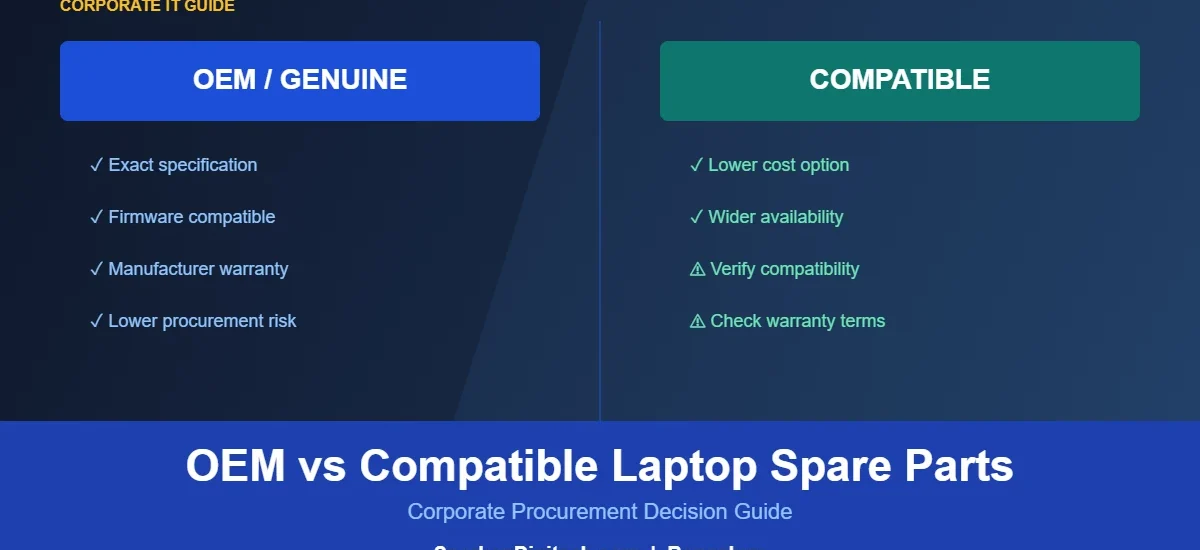
OEM vs Compatible Laptop Spare Parts: Quick Comparison
| Factor | OEM / Genuine | Compatible (Third-Party) |
|---|---|---|
| Source | Laptop manufacturer or authorised production | Third-party manufacturer |
| Compatibility | Designed for specific model — high certainty | Designed to work with specified model — must be verified |
| Specification | Matches original specification | Varies by manufacturer and product |
| Quality consistency | Generally consistent within manufacturer | Varies significantly across suppliers |
| Warranty | Manufacturer warranty for new parts | Supplier warranty — terms vary widely |
| Firmware compatibility | Full — including BIOS/embedded controller handshake | Varies — some components may trigger firmware warnings |
| Availability | Typically 3–5 years post-production | May be available for older models after OEM supply ends |
| Price | Generally higher | Generally lower — but quality and warranty must be assessed |
| Procurement risk | Lower for compatibility and reliability | Higher unless supplier, testing and warranty are verified |
| Suitable use cases | Warranty-covered devices; business-critical users; exact-spec requirements | Out-of-warranty devices; lower-risk components; verified compatibility |
| Corporate considerations | Safest default; preferred where policy or warranty requires | Can be appropriate with proper supplier qualification |
OEM vs Compatible: Which Is Better for Corporate IT?
“Better” depends on the specific component, the device’s status, and the business context. A framework approach is more useful than a categorical answer:
Choose OEM/genuine parts when:
- The laptop is under active manufacturer warranty — using non-OEM parts may void coverage
- The device belongs to a business-critical user (senior management, field sales, customer-facing staff) where rapid return to service is essential
- The component requires exact firmware compatibility — particularly batteries, which in modern laptops often communicate with the BIOS via a charge controller that verifies component identity
- Corporate policy requires OEM sourcing — some organisations or their compliance frameworks specify this
- The component is safety or power-sensitive (batteries, adapters) and the procurement team cannot sufficiently verify a compatible alternative’s specification and testing
- The laptop model is relatively new and within the OEM’s active supply period
Compatible parts can be considered when:
- The laptop is outside OEM warranty and OEM sourcing is not a policy requirement
- The supplier can confirm: specific part compatibility (not just “fits most models”), testing process, warranty terms, and return policy
- The component category has lower sensitivity to specification differences — keyboards, hinges, some mechanical parts — compared to power and display components
- Cost optimisation is commercially important and the risk is well understood
- The device is approaching end of its operational lifecycle and OEM parts are no longer available or are disproportionately expensive relative to device value
- The company has tested a specific compatible component from a specific supplier in a controlled quantity before bulk ordering
Which Laptop Spare Parts Are More Sensitive to Quality?
| Component | Procurement Consideration | Sensitivity |
|---|---|---|
| Battery | Voltage, capacity, cell quality, firmware handshake, safety certification | High — power and safety component |
| Adapter/charger | Voltage, current, connector, safety regulation compliance | High — power delivery; incorrect spec causes board stress |
| Display assembly | Panel spec, resolution, connector, brightness, mounting | Medium-High — physical fit does not guarantee spec match |
| Motherboard | Exact model/FRU; firmware; high replacement value | Very High — almost always OEM or verified equivalent |
| Cooling fan | Connector, dimensions, RPM curve, thermal performance | Medium — incorrect spec affects thermal management |
| Display cable | Exact connector and model-specific routing | Medium — minor spec differences cause display issues |
| DC/USB-C charging port | Physical fit, electrical compatibility | Medium — connector damage risk if spec varies |
| Keyboard | Layout, language, backlight, connector, frame fit | Low-Medium — well-documented specs reduce compatibility risk |
| Hinges | Physical fit, torque specification, build quality | Low-Medium — mechanical part; quality still matters |
| Speakers | Connector, dimensions, model compatibility | Low — lower-risk mechanical/electrical component |
OEM vs Compatible Laptop Batteries: Why More Care Is Needed
Batteries warrant a dedicated section because they differ from most other spare parts in two important ways: they are safety components, and they involve firmware-level interaction with the laptop.
Modern laptop batteries — particularly on business-class devices from Lenovo, HP, Dell and others — include a charge controller chip that communicates with the laptop’s embedded controller and BIOS. This communication conveys: the battery’s reported capacity, charge state, temperature, and in some implementations, a component identity check. Some laptops display warnings or limit charging behaviour when a non-verified battery is detected.
Beyond firmware, the physical and electrical specification must be verified: voltage (V), capacity (Wh or mAh), cell configuration, connector type and physical dimensions. “Fits most models” is not a sufficient specification for a corporate battery procurement. The correct FRU number identifies the exact battery required for a specific machine type and generation.
When evaluating a compatible battery:
- Confirm the exact FRU or part number match — not just model name
- Ask whether the cells meet the original capacity and voltage specification
- Ask about the manufacturer’s safety testing and certification
- Confirm the firmware/BIOS compatibility for the specific laptop model
- Check the warranty period and return/replacement policy
For organisations managing large fleets, the cumulative risk of battery-related failures — device downtime, thermal incidents, insurance implications — makes battery procurement one of the higher-stakes spare-parts decisions. See our guide to laptop motherboard problems for more on how power-related failures can cause cascading board damage.
OEM vs Compatible Laptop Displays
Display replacement is a common requirement in corporate fleets — particularly where devices are used in field environments or transported frequently. A display assembly that physically fits a laptop chassis is not automatically the correct replacement. The following specifications must be verified:
- Screen size and resolution: Measured diagonally; even within the same laptop model, multiple resolution options (FHD, QHD, WUXGA) may have been offered
- Panel type: IPS, TN, OLED — different panel types are not interchangeable even if physically compatible in size
- Connector type and pin count: EDP (embedded DisplayPort) connectors may have different pin configurations across panel variants
- Touch vs non-touch: Touch-capable panels require additional connector and cable routing
- Brightness specification: Some business-class laptops offer multiple brightness tiers — a lower-brightness replacement may not meet the original specification
- Display cable compatibility: The cable connecting the motherboard to the display panel must match both ends — a replacement panel may require a different cable
Ordering a display by model name alone — rather than by FRU number or exact panel specification — is a common cause of incorrect parts. A reliable supplier will request FRU confirmation before supplying a display assembly.
OEM vs Compatible Laptop Keyboards
Keyboards are among the more commonly replaced laptop components, and also among the lower-risk categories for compatible sourcing — provided the specification is correctly verified. Key compatibility factors:
- Language and layout: UK, US, Indian regional layouts differ in key position and labelling
- Backlight: Backlit keyboards require specific connector routing; a non-backlit keyboard installed in a backlit position will not function correctly
- Connector type and position: Keyboard ribbon connectors vary between chassis versions within the same model family
- Frame integration: Some laptop models use keyboards that are bonded to the palmrest assembly — correct identification of whether the keyboard is a standalone part or integrated with the palmrest prevents incorrect ordering
- Generation: The same ThinkPad model name across Gen 1, Gen 2 and Gen 3 may use different keyboard assemblies
Before bulk ordering keyboards for a fleet, verify the exact part against one unit of the specific machine type and generation. A test installation before bulk procurement is standard practice for any component being ordered at volume.
Used, Pulled and Refurbished Laptop Spare Parts: What Corporate Buyers Should Know
Used / Pulled Parts
A pulled part is a component removed from another laptop — either a decommissioned unit, a damaged device where other parts are serviceable, or a device sold for parts. The component’s actual condition depends entirely on the source laptop’s history: a part pulled from a well-maintained 18-month-old device is different from one pulled from a heavily-used unit with an unknown service history.
Before procuring used/pulled components, ask the supplier:
- What device was the part pulled from? (age, model, known condition)
- Has the component been functionally tested after removal?
- Is there a grading system (A-grade, B-grade) and what does it mean?
- What warranty is provided on the pulled component?
- What is the return policy if the part fails on installation?
Refurbished Parts
A refurbished part has undergone some form of inspection, cleaning, or remediation before being resold. The scope of refurbishment varies widely: some suppliers clean and test the part; others replace sub-components (for example, installing new cells in a battery housing) and re-grade the unit. Refurbishment quality is supplier-specific — ask specifically what the refurbishment process involved, what was replaced, and what testing was done after refurbishment.
For corporate procurement, refurbished and pulled parts are most commonly used for ageing laptop models where OEM parts are no longer in active production and compatible new alternatives are not available. They are generally not the first choice for business-critical devices or warranty-covered laptops.
How to Decide Which Part Type Your Company Should Buy
| Question | If YES | If NO |
|---|---|---|
| Is the laptop under active OEM warranty? | Check whether warranty requires OEM parts; non-OEM may affect coverage | Continue evaluation |
| Is this a business-critical device? | Prefer lower-risk option; OEM generally preferred | More flexibility in procurement decision |
| Is exact firmware compatibility required (battery)? | OEM/genuine strongly preferred | Verify firmware compatibility of compatible option |
| Has compatibility been verified by FRU or part number? | Continue evaluation | Do not proceed until verified — description-only ordering is high-risk |
| Has the compatible part been tested? | Continue evaluation | Request testing details or consider OEM alternative |
| Does the supplier offer warranty and return terms? | Continue evaluation | Elevated risk — evaluate carefully or source OEM |
| Is the price difference commercially significant? | Compare total cost including downtime, return risk, repeat repair | OEM may be simpler with minimal cost premium |
| Is the laptop approaching end of operational lifecycle? | Lifecycle economics may favour compatible or used options | Prioritise quality and longevity of repair |
Total Cost of Ownership: Don’t Compare Only Purchase Price
The purchase price of a compatible component may be lower than its OEM equivalent. But part price is not the same as total cost. For corporate procurement, the relevant comparison is the total cost of the procurement decision — which includes factors that do not appear on the component invoice:
- Installation cost: Technician time is a real cost. If a component requires two installation attempts due to compatibility issues, the second installation adds cost regardless of part price
- Failed installation: A part that is returned after a failed installation incurs: return shipping, technician time, re-ordering, additional supplier lead time, and extended device downtime
- Employee downtime: A device out of service for 3 additional days due to a failed compatible part has a cost that is not visible in the parts comparison but is very visible to the employee and their manager
- Repeat repair: A component with a shorter effective service life than the OEM equivalent may require replacement sooner, adding a second procurement and installation cycle
- Inventory carrying cost: A compatible part that is ordered in bulk based on price before being tested in a real installation creates inventory risk if it subsequently fails compatibility checks
The practical conclusion is not that OEM parts are always the lower total cost — a properly specified and tested compatible component from a qualified supplier, with a clear warranty, may well be the sensible choice. The conclusion is that total cost evaluation should inform the decision, not purchase price alone.
Questions to Ask a Laptop Spare Parts Supplier
Before placing a corporate spare-parts order — particularly for a new supplier or a new component type — ask:
- Is this part OEM/genuine, compatible (new third-party), used/pulled, or refurbished?
- What is the exact part number or FRU number?
- Which specific laptop models and machine types does this support?
- Has compatibility been verified for this specific model and generation?
- Has the part been tested? If so, what testing was performed?
- What warranty period is provided and what does it cover?
- What is the return and replacement policy for defective or incompatible parts?
- For used or refurbished parts: what was the source and what refurbishment was done?
- What condition or grade is the part?
- Is this part expected to be consistently available for repeat orders?
- Can you support bulk requirements with consistent supply?
- Can you provide GST-compliant commercial documentation?
- Can you provide specifications or photographs if required before ordering?
- What information do you need from us to confirm compatibility?
A professional supplier will have clear answers to these questions. If a supplier cannot state the part type, provide the FRU number, or articulate their warranty terms, that is relevant procurement risk information.
OEM vs Compatible for 50, 100 and 500+ Laptop Fleets
Fleet size affects not just the volume of parts required, but the structure of the procurement decision. For a detailed inventory and procurement framework by fleet size, see our article on spare-parts procurement for 50, 100 and 500+ laptop fleets. In terms of the OEM vs compatible decision specifically:
50-laptop fleet
At this scale, the priority is model standardization and reliable supplier relationships rather than complex procurement policy. For a standardized fleet of 2–3 models, identifying a preferred part type (OEM or a specific verified compatible) per component category and sticking to it simplifies procurement and maintains quality consistency. Avoid introducing multiple suppliers for the same part type before testing one thoroughly.
100-laptop fleet
Repair history data becomes available at this scale and should inform the OEM vs compatible decision by component. If a specific compatible keyboard from a verified supplier has performed reliably over 12 months of repair history, that is meaningful data. If a compatible battery has generated returns, that is equally important. Decisions should be evidence-based rather than policy-assumed.
500+ laptop fleet
At this scale, the OEM vs compatible decision should be codified in a procurement policy per component category — not left to individual technician or purchase-order preference. The policy should specify: approved part types per component, approved suppliers, FRU number databases, and the conditions under which an alternative may be considered. For companies with multi-brand, multi-location fleets, consistent part-type policy reduces quality variance and simplifies inventory management.
Common Mistakes Companies Make When Buying Laptop Spare Parts
- Choosing based only on price — without evaluating total cost or supplier qualification
- Not verifying the FRU or part number — ordering by model name is the single most common cause of wrong parts
- Assuming all compatible parts are equivalent — quality varies enormously across suppliers and product categories
- Not asking about warranty — a part without a supplier warranty adds significant procurement risk
- Not checking the laptop generation — the same model name in Gen 1, Gen 2 and Gen 3 may use different components
- Ignoring connector differences — connectors vary between chassis revisions even within the same product line
- Mixing grades in fleet inventory — using both OEM and compatible parts of the same type without tracking which is which creates quality control issues
- Not documenting supplier and part details — repeat procurement of the same verified part requires knowing exactly what was bought the first time
- Bulk ordering before testing — test a compatible component at volume before committing to a large quantity
- Not checking return terms — a supplier that will not accept returns on incompatible parts is a procurement risk
- Ignoring end-of-life models — for laptops near retirement, the economics of OEM vs compatible vs used parts are different from a newer fleet device
- Not evaluating total cost of ownership — procurement decisions based on part price alone miss the real financial comparison
Corporate Laptop Spare Parts Procurement Checklist
| Item | Status |
|---|---|
| Laptop brand and model verified | □ |
| Machine type and generation verified | □ |
| FRU/part number confirmed | □ |
| Part category and component identified | □ |
| OEM / genuine / compatible / used / refurbished status confirmed with supplier | □ |
| Compatibility confirmed (not just “fits most models”) | □ |
| Testing status confirmed | □ |
| Warranty terms confirmed | □ |
| Return/replacement policy confirmed | □ |
| Quantity and availability confirmed | □ |
| GST/commercial documentation confirmed | □ |
| Total cost (including downtime and return risk) evaluated | □ |
| Test installation completed before bulk order (for new suppliers/parts) | □ |
| Part and supplier details documented for repeat ordering | □ |
Frequently Asked Questions
Q: What is the difference between OEM and compatible laptop spare parts?
OEM (Original Equipment Manufacturer) parts are produced to the laptop manufacturer’s specification — either by the manufacturer or a contracted supplier — and are model-specific. Compatible parts are produced by third parties designed to work with specific laptop models. The key differences are specification certainty, firmware compatibility (particularly for batteries), warranty structure, and quality consistency.
Q: Are compatible laptop spare parts suitable for corporate use?
Some compatible parts from established, qualified suppliers — with verified compatibility, testing, and warranty coverage — are used in corporate environments. The suitability depends on the component category, the supplier’s qualification, the device’s warranty status, and the business-criticality of the repair. Compatible parts are not categorically unsuitable, but they require more thorough evaluation before procurement than OEM parts.
Q: Are OEM laptop parts always better?
OEM parts offer specification certainty, firmware compatibility and manufacturer warranty — making them the lower-risk default for most corporate use cases. However, for out-of-warranty devices, lower-risk component categories (keyboards, hinges), and situations where OEM parts are unavailable or disproportionately expensive for an ageing device, properly verified compatible alternatives may be commercially appropriate.
Q: Should companies use OEM batteries?
For most business-critical laptops and warranty-covered devices, OEM batteries are the recommended choice. Batteries involve firmware-level communication with the laptop’s BIOS, have safety implications, and their specification must be exact. Compatible batteries from qualified suppliers with verified specification and tested firmware compatibility can be considered for out-of-warranty devices, but require more thorough evaluation than lower-risk components.
Q: How can I verify whether a laptop spare part is compatible?
The most reliable method is FRU/part number verification — checking the specific FRU number for the component against the laptop’s service manual (available from the manufacturer’s support site). The machine type/model number (found on the laptop’s base label) is required to identify the correct FRU. A reliable supplier will request FRU confirmation before supplying the part.
Q: What is an FRU number?
FRU stands for Field Replaceable Unit. An FRU number is a manufacturer-assigned identifier for a specific spare part, tied to specific laptop models, machine types and revisions. It is the most reliable way to identify and order the correct component — more precise than model name or description alone. FRU numbers are listed in the laptop’s hardware maintenance manual, available from the manufacturer’s support site.
Q: Should companies buy used laptop spare parts?
Used (pulled) parts can be a practical option for ageing laptop models where OEM parts are no longer available and compatible new alternatives do not exist. The key requirements are: confirmed functional testing after removal, condition grading, stated warranty, and a clear return policy. Untested, ungraded used components carry higher failure risk and are not suitable for business-critical repairs.
Q: Are refurbished laptop parts suitable for business laptops?
Refurbished parts vary significantly in quality depending on what the refurbishment process actually involved. Ask specifically: what was inspected, what was replaced, how was it tested, and what warranty applies. A properly refurbished component with documented testing and a stated warranty can be suitable for non-warranty, non-critical applications. The quality of the refurbishment process is the determining factor.
Q: What should companies ask a laptop spare-parts supplier?
The key questions are: part type (OEM/compatible/used/refurbished), FRU/part number, which laptop models it supports, compatibility verification method, testing performed, warranty terms, return policy, condition grading, and GST documentation availability. A supplier who can answer these questions clearly and specifically is demonstrating professional practice.
Q: How should companies compare OEM and compatible parts?
Compare on: specification match (FRU verified vs description only), firmware compatibility (especially for batteries), testing status, warranty coverage and duration, supplier return policy, and total cost of ownership including potential downtime and return costs — not purchase price alone.
Q: Which laptop parts should be sourced most carefully?
Batteries and power adapters carry the highest risk due to safety and firmware implications. Display assemblies require exact specification verification. Motherboards are the highest-cost component and should be OEM or verified-equivalent unless the device economics clearly justify otherwise. Keyboards and hinges are among the lower-risk categories for compatible sourcing, provided specification is verified.
Q: Can companies buy compatible parts in bulk?
Yes — but only after testing the specific compatible component from the specific supplier in a small quantity first. Testing one or two units validates compatibility, firmware behaviour (for batteries) and quality before committing to a bulk order. Document the exact FRU/part number and supplier details so the same verified component can be reordered consistently.
Conclusion
The OEM vs compatible laptop spare-parts decision is not a binary one. For business-critical devices, warranty-covered laptops, and power/safety components like batteries and adapters, OEM/genuine parts provide specification certainty and lower procurement risk. For out-of-warranty devices, lower-risk mechanical components, and situations where a properly qualified compatible supplier provides verified compatibility, testing and warranty coverage, compatible parts can be a commercially appropriate option.
The consistent principles across both choices are: verify by FRU number (not model name), evaluate supplier qualification (not just price), assess warranty and return terms, and evaluate total cost of ownership — not just the part price on the invoice. For organisations managing laptop fleets of any size, a consistent, documented approach to this decision produces better outcomes than ad-hoc reactive purchasing.
Need Help Sourcing the Right Laptop Spare Parts?
If your company needs laptop spare parts — OEM, genuine, compatible or refurbished — for a specific brand, model and machine type, SparkonDigitech can help you identify and source the correct component based on your requirements.
To receive a quotation, share: laptop brand, model, machine type, generation, required component, FRU/part number if available, quantity, and preferred part type.
For AMC service requirements and corporate laptop repair, see our guides to laptop AMC services in Bangalore and corporate laptop repair services.
Contact us: +91 98451 41787 | sales@sparkondigitech.com
696, 4th Main Rd, BEML Layout, 5th Stage, Rajarajeshwari Nagar, Bengaluru – 560098
Need help with this for your company? See our laptop spare parts in Bangalore page, or call +91 98451 41787 (Mon–Sat, 10 AM–7 PM).